
An invoice arrives by email. Someone downloads it, forwards it to the right person and waits for approval. A signed contract sits in another inbox, while the latest version of a document is buried somewhere in a shared folder. This may work when a company is small.
As the number of employees, documents and approval steps grows, it becomes difficult to know what has already been approved, what is still waiting and where the final version is. A document management system can bring these processes into one structured workflow. The important part is choosing and implementing it around the way your company actually works.
When do emails stop being enough?
Email is useful for communication, but it is a poor place to manage a process. Consider a supplier invoice. It arrives by email, someone registers it, a manager approves it and accounting processes it. If one person misses the message, the whole process can stop.
A structured workflow makes each step visible. Employees can see who is responsible, what is waiting for approval and what happened earlier. This is particularly useful when document digitalization is already part of a wider move away from paper-based processes.
What should a document management system handle?
A document management system (DMS) should do more than store files. Depending on the company’s needs, it may support:
- document routing and version control,
- document approval workflows,
- access permissions and document history,
- electronic signatures.
The exact features depend on the solution and the process.
More functionality is not automatically better. A clear workflow matters more than a long feature list. If documents also need to connect with customer or sales data, CRM integration may be relevant. For finance and operational processes, the connection with an ERP system can be even more important.
How do you design an electronic document workflow?
Do not start by configuring the software. Start with one real document. Take a supplier invoice and follow it from arrival to final processing.
- Who receives it?
- Who checks the details?
- Who approves it?
- What happens if something is missing?
This simple exercise often reveals unnecessary handovers and manual checks. An electronic document workflow should reflect the actual sequence of work. If employees still have to forward emails or copy information between systems, the new solution has only moved the problem.
What should you check before choosing a system?
Start with the workflows that cause the most friction. Then check whether the system can support them without excessive customization. Pay particular attention to:
- approval rules and responsibilities,
- permissions and document history,
- integrations with ERP, CRM and accounting,
- search and version control,
- electronic signatures.
The last point matters because a signature should not be the end of a process. The signed document may still need to be stored, linked to a transaction or passed to another department.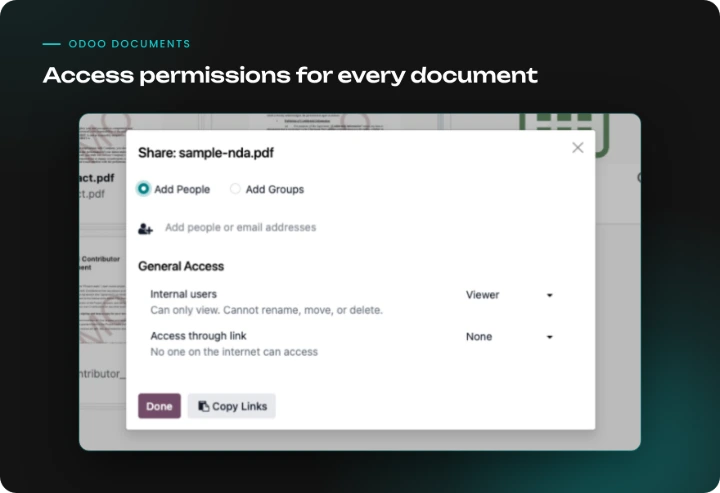
How does document management work in Odoo?
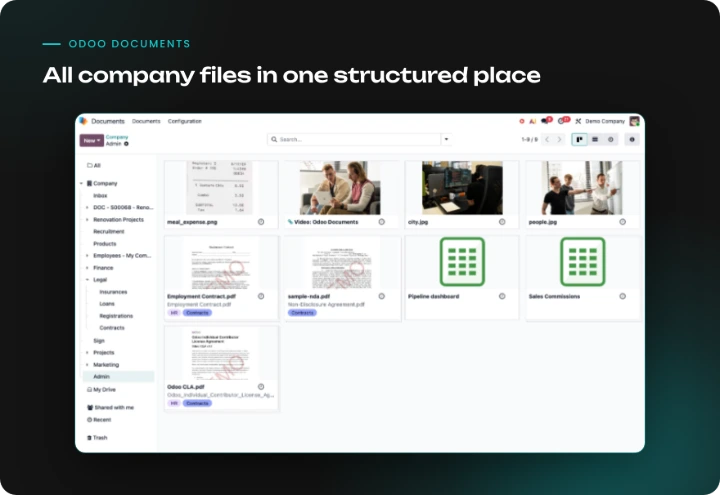
In Odoo, document management is handled by the Documents app, which connects directly with accounting, HR, sales and other modules. For example:
- Supplier invoices can be sent to a folder’s email address or uploaded to the accounting folder in Documents, then turned into vendor bills in a few clicks, with the data extracted by AI-based digitization. Once file centralization is enabled, accounting files can also be organized automatically into sub-folders by journal.
- Files are organized in folders, with access permissions for users, groups or shared links.
- The Sign app handles electronic signatures, and the signed document stays in the system instead of in someone’s inbox.
- Every record keeps its history in the chatter, so it is clear who changed or approved what.
- Approval steps can be added with the Approvals app or approval rules in Odoo Studio. More complex, multi-level approvals may require additional configuration.
How should you approach implementation?
You do not need to move every document into the new system on day one. Start with one or two processes where manual work causes the most problems. Define the steps, responsibilities and exceptions, then configure the system around them. Where possible, stay close to standard functionality.Customization has its place, but rebuilding every existing exception can make the solution harder to maintain. The same principle applies to ERP projects. Solvti's Odoo implementation checklist can help identify the questions worth answering before implementation begins.
Is a document management system always necessary?
No. If a company has few documents and a simple approval process, a dedicated DMS may add unnecessary complexity. Sometimes the real problem is unclear responsibility rather than missing software.A structured system becomes more valuable when documents move between departments, require several approvals or need to connect with other business processes. The goal is not to eliminate email. It is to stop the inbox from being the place where the entire workflow lives.
Document management system: what is the next step?
Moving from email attachments and paper signatures to a structured process starts with understanding how documents move through the company today. Map the workflow, identify the bottlenecks and decide what the system actually needs to automate. Then choose a solution that fits the process rather than forcing the process around the software.A document management system can also become part of a wider Odoo ERP environment when documents need to connect with sales, inventory, finance or other operations. If you are considering a new document workflow, contact Solvti to discuss the process and the right implementation approach.