The company grows → time to automate → we need an ERP → so let's collect the requirements from every department: Finance needs one report for four entities, the warehouse has to handle three sites at once. Your CFO just saw the price tag from a big ERP vendor and doesn't know what to say. Now you have to come up with a realistic plan to make all of that work together.
Sound familiar?
So you start reading up on Odoo scalability, and you get two kinds of answers:A) Odoo representatives telling you it scales beautifully.B) Consultants who sell something else telling you it's an SMB toy that falls over the moment you get serious.
Neither group is going to tell you where the real line sits.
Don't worry your head about it - I'm here to tell you how it really is without the sales pitch.
So, let's get down to business:
First: what do we even mean by "large"?
This matters, because "large company" means something different to everyone.Odoo is not meant for massive global corporations with tens of thousands of staff. If a vendor says it can handle a business that big, they are just trying to sell you something.
But most businesses calling themselves large are in a totally different spot:
- 100 to 1,000 workers
- 2 to 6 companies, sometimes across borders
- several stock rooms or manufacturing plants
- real sign-off steps, because no one wants a junior worker approving a huge purchase bill
- 50 to 300 people active in the system every day
- Here, Odoo scalability is a real purchasing question, not a theoretical debate. The simple answer? Yes, it works, but you need to know a few things first.
Let's consider a few concrete examples:
Where Odoo handles scale well: practical examples
The thing that separates a mid-market ERP from a small business tool is whether it can run several companies in one database without turning into a mess.Odoo does this through multi-company setup in Settings:
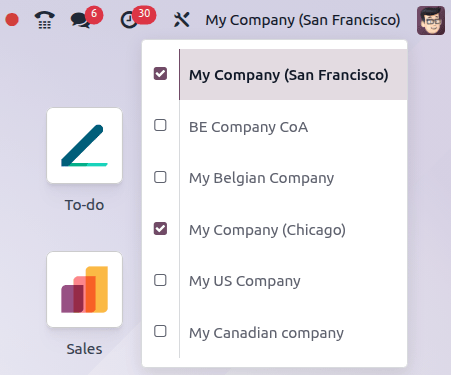
Photo: Odoo.com
Who sees what across companies
The logic is simpler than most people expect. Leave the Company field on a record empty and every company sees it. Assign companies and visibility narrows to those.
Products and contacts are shared by default, which is usually what you want. Quotations, customer invoices and vendor bills stay tied to the company you're logged into, which is also what you want (the guy in Poland has no business seeing your German invoices).
Prices, costs and cross-border reporting
Keep this in mind before building anything: products share the same price and SKU across all your companies, but cost is set per company. That is fine, but you will need to plan your cross-border profit reporting carefully.
Selling between your own entities
Odoo can automate sales and inventory updates between your own companies, once you switch those options on. When one entity sells to another, the matching invoices and stock movements are generated on the other side. This prevents long, manual spreadsheet work at the end of the month (That's a BIG win, trust me!)
The warehouse nobody warns you about
One warning worth repeating: Odoo does not automatically create warehouses for companies you add after the initial database setup. You create those by hand. Just so you know, nobody enjoys discovering that after a couple of weeks.

Managing user permissions at enterprise scale in Odoo
At 20 users, access rights are a formality. At 300, they're the whole game.
Odoo uses two security layers. First, access rights decide if users can view, edit, create, or delete items in an app. Second, record rules apply extra filters across the whole system. For example, making sure salespeople only ever see records belonging to their own clients.There is also a login protection feature that usually comes up when a big client's tech team gets involved: user groups can have an idle time limit that locks the screen (optionally behind two-step verification) and a total session time limit that signs the user out completely.
How approval chains work in Odoo
Big companies rely on approval chains, not trust. Odoo lets you lock specific buttons until the right managers sign off. You can assign single approvers or groups, build multi-step workflows, and stop the same person from approving two steps in a row.
Every decision lands in the chatter, and there's a separate Studio Approval Entries log if somebody needs the full audit trail.
Delegation is built in too, which matters more than it sounds when your CFO goes on holiday for two weeks in August.
Automation rules in Odoo 19
Automation rules (worth noting the name, because plenty of older articles still call them automated actions) - Automation in Odoo starts with triggers like field updates, emails, timers, webhooks and so on. Once triggered, the system can update records, create tasks, send messages, notify outside tools and more.e
Where Odoo scalability needs real work
I'm not going to pretend this part doesn't exist.
Custom code always costs money down the road
Running custom scripts in automations is useful, but maintaining them is not covered by the Standard plan or the Custom plan. It costs extra.The rule here is simple: use standard system features whenever possible, and build custom code only if it gives your business a major advantage. Remember, every line of custom code will need testing and updating every time you upgrade.
Multi-company changes your licensing
If you are on the Standard plan, switching multi-company on moves you to Odoo's Custom plan. It does not apply to One-App Free, and if you are already on Custom, nothing changes. Double-check official Odoo rates before building your financial plan (or ask us how much it will cost you).If you want to understand better how pricing works in Odoo, read this article.
What Odoo for big companies looks like with real numbers
Theory is cheap, so here's a live one.
Iris Galerie handles over 10,000 orders a month, selling globally online and in stores with custom production for almost every order. They were already using Odoo, but fast growth meant the original setup could not keep up with their volume.Around 48 people in the Polish operation.
What came out the other side: 99% on-time delivery, order processing more than 40% faster, roughly half the manual operations gone. Same team, no headcount added. This example, as clear as day, shows that Odoo works great for larger companies.
The part I'd want to mention as well is that the whole thing was rebuilt on a running system. As Klaudia from our team put it, the client was working the entire time, so there was no option to stop for a month, click around and see what sticks. Every single change needed its own rollout plan.

You can read the whole story here
When Odoo is the wrong call for a large company
You came here for a straight answer, so here's the other side.
Are your industry compliance requirements so specific that certified vertical software already exists and auditors expect it? Forget about Odoo. If you run a pharma business, Odoo is just a bad idea, it would require way too much custom code to pass compliance.
Look elsewhere if the honest reason for the project is that a competitor implemented something and your board wants to match them. Implementing an ERP because everyone else has one is the fastest way to burn a serious budget on nothing.
And think hard if your organisation genuinely cannot change a single process. Odoo is flexible, but the smoothest large implementations we've seen are the ones that adapted the company to the standard system wherever it was reasonable, and customised only what actually made them money.
One more important thing: if your current chaos is a data problem rather than a system problem, fix the data first. A bigger system automates bad data faster (you don't want that).
So, is Odoo scalable enough for you?
So, can Odoo handle your growth? For a business with:
- hundreds of workers,
- several companies,
- multiple stock rooms,
- real sign-off steps
- ...then yes. Odoo's capacity holds up at this level, and its boundaries are known factors you can prepare for instead of painful surprises.
But listen carefully now - when it comes to achieving success in implementing Odoo for a large company, the deciding factor usually isn't the software at all.Large implementation lives or dies on rollout planning and on somebody telling you which 20% of your requirements you should quietly drop. If you want a sense of what to look for, we wrote about choosing an Odoo partner and about the total cost of ownership behind these projects.
And if you'd rather just describe your setup and hear where the real risks are, get in touch. We work with Odoo daily, including at this scale, and we'll tell you honestly if we think it's a bad fit.